
Hidemium is the best anti-browser software in 2023, overcoming many shortcomings. This tool is for those who need to use multiple accounts with different profiles on the same computer. These profiles are as independent as real users, separate in browser fingerprints: IP address, User-agent, proxy, cookies, time zone, language, media device, hardware, and more. Instead of having to invest in many computers, or use many virtual machines, now you can set it up all on one of your computers.
- E-commerce platforms: Shopee, Lazada, or international floors Amazon, eBay, Etsy,v.v.
- Social networking platforms, advertising: Facebook, Google, Tiktok, Instagram,v.v.
- Electronic money
Anti-detect browser technology is synthesized and built by a team of excellent and experienced programmers. The application is regularly improved and upgraded to increase efficiency and optimal user experience.
Features of anti-detect browser Hidemium software
New Profile
Overview
Features when creating an account on Hidemium:
- Profile name: Create a profile name (Hidemium automatically creates or you edit).
- Save to Folder: Select the Folder to manage the Profile (Create Folders to manage account types).
- Operating system: Support Operating system (Windows, macOS, Linux, Android).
- Browsers: Browsers (Chrome, Edge, Safari, Firefox).
- Proxy settings: Select import proxy (supports HTTP, Socks 4, Socks 5, SSH types).
- Timezone, WebRTC, Geolocation: Fingerprinting Timezone, WebRTC, and Geolocation based on external IP are automatically enabled. If automatic is disabled, you can manually reset each criterion in the next step.

Proxy
As the overview above, Hidemium supports a variety of proxies, including:
- HTTP proxy: is a method of HTTP connection using IP emulation.
- Socks 4 proxy: is a method of connecting socks 4 using IP emulation.
- Socks 5: is a method of connecting socks 5 using IP emulation.
- SSH: Proxy over SSH is an innovation that other anti-detect software does not have.

Alternatively, you can choose whether to import or run a random proxy history:

Timezone
This feature is the default, and you should follow the software because the time zone is based on the IP address or proxy you are using. It guarantees the best for browser profiling.

Besides, you can still manually enter the desired time zone without relying on the IP address or proxy.

WebRTC
You should leave this feature by default by Hidemium. It allows setting WebRTC parameters based on IP address and proxy.

Or you can manually adjust the WebRTC address.

Geolocation
It is a feature that allows setting geolocation based on IP address, and proxy.

Geolocation also allows you to set your browser’s current location manually.

Allow feature: allows you to use the original location of your computer even when using a proxy or sock.

Block is a feature that blocks websites from reading your location from both the computer and the proxy.

Cookies
Advanced
- Navigator
- Font
- Media Device
- Hardware
- Extension: This feature allows adding utilities to the profile system managed on Hidemium software. When using browsers like Google Chrome, we often add more attachments to make it faster each time we open it. Similar to Hidemium, the Extension feature is designed so that you can easily add it to any profile.

- Bookmarks
- Autofill
Profiles
- In the Profiles section, you can quickly create (Quick Create) profiles or edit them as you like (Add Profile).

- Share Profile
- Run CookieRobot
Create Folder
You will easily manage your work arrays with the Folders feature – dividing groups to operate. For example, you need to use Facebook and Gmail management accounts. Now, use the Folder feature to group separate Facebook and Gmail profiles. So every time you manage a task related to an account, you need to select the group and open it with a simple operation.

To create a Folder, select Folder> Add Folder> Enter the name of the Folder you want to make (so that it is easy to manage)> Click Add.

After creating the Folder, go back to the Profiles section to select the Profile you want to add to that Folder.
In addition, you can Share permissions for other team members to manage work.

Import – Export and manage proxies in bulk
Hidemium is more convenient when developing a batch proxy management tool.
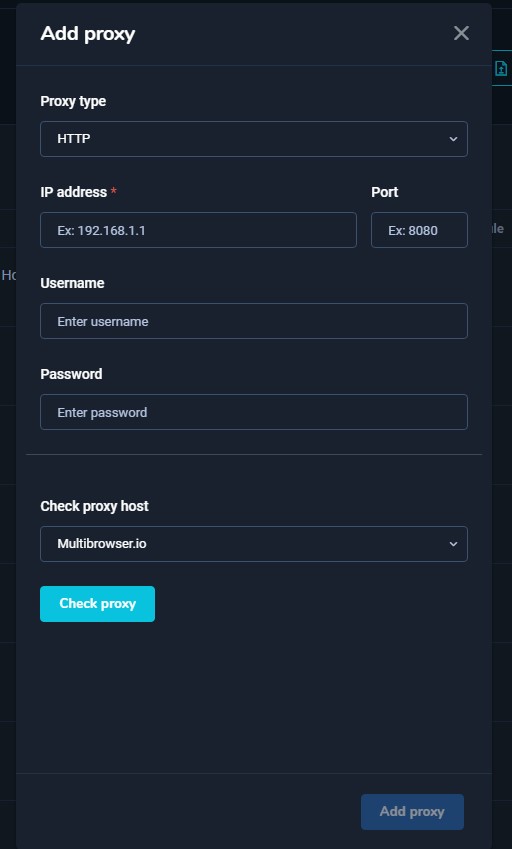
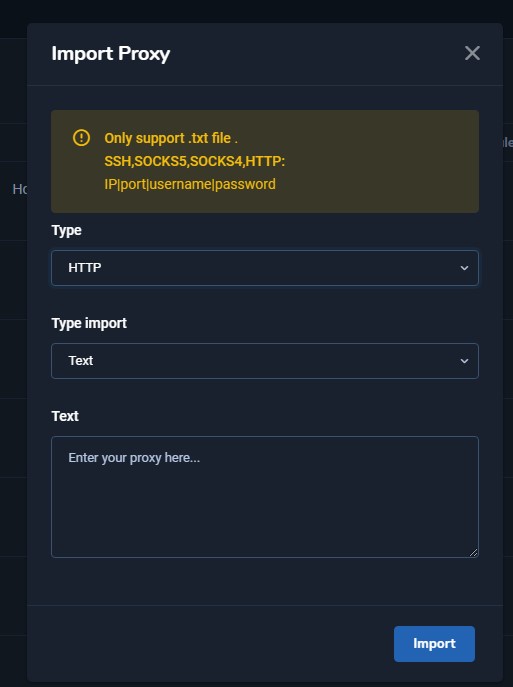
Once you have entered the list of proxies, you can return to the Profiles section to select the Profile you want to add a proxy to (as introduced in the New Profile > Proxy section above).
Besides, Hidemium also supports downloading the proxy list on the software with the Export feature in the Proxies section.
If you need to learn more about the Hidemium user manual, contact the team via:
- Official website: https://hidemium.io/
- Telegram group: https://t.me/hidemium
- Facebook Fanpage: https://www.facebook.com/hidemium.official
- Email: [email protected]
Related Blogs

The restricted or locked account is probably a headache for businesses and advertising people. Facebook advertising is the leading trend in promoting online business in the 21st century. Most companies choose to advertise if they want to reach the right potential customers and generate sales quickly. Having an account problem will directly affect revenue. So […]

In the digital age, as internet usage becomes more widespread, so do threats from viruses and hackers stealing data. That’s why proxy servers have become essential tools, helping users safeguard their personal information and access the web more securely.This article by Hidemium introduces you to the 15 best free proxy websites available today—tools that help you browse efficiently, securely, and[…]

Online marketers often manage dozens to hundreds of accounts the same time. So how to do they do?You have everything from social and merchant accounts for yourself and your clients. Each account must be accessible by different people, such as VAs (virtual assistants) and team members, throughout any given project. You need an effective way to allow access without setting off verification alarm[…]

More than three decades ago, eBay started as a small auction site where people could sell their old items to earn extra income. By 2025, the platform had become an e-commerce giant, trusted by thousands of sellers to grow their businesses. However, while eBay has been constantly improving its security systems to protect users, it has also implemented strict regulations – sometimes[…]

Các Bước Tạo Script Automation Cho Người Mới Bắt Đầu. Một tính năng mang tính đột phá và hiện đại trong phần mềm Hidemium mà bạn không thể bỏ qua đó chính là Automation. Tính năng này cho phép người dùng có thể tạo ra những kịch bản (script) cho những quy trình phục […]

As scraping, automation, SEO monitoring, market research, and multi-account farming continue to grow in demand, proxy providers are evaluated based on three core factors: anonymity – stability – scalability.IPcook has become a platform gaining attention in the tech community thanks to its 55M+ IP pool, support for 185+ countries, multiple proxy types, and full API integration tailored for large[…]
