
Hidemium is the best anti-browser software in 2023, overcoming many shortcomings. This tool is for those who need to use multiple accounts with different profiles on the same computer. These profiles are as independent as real users, separate in browser fingerprints: IP address, User-agent, proxy, cookies, time zone, language, media device, hardware, and more. Instead of having to invest in many computers, or use many virtual machines, now you can set it up all on one of your computers.
- E-commerce platforms: Shopee, Lazada, or international floors Amazon, eBay, Etsy,v.v.
- Social networking platforms, advertising: Facebook, Google, Tiktok, Instagram,v.v.
- Electronic money
Anti-detect browser technology is synthesized and built by a team of excellent and experienced programmers. The application is regularly improved and upgraded to increase efficiency and optimal user experience.
Features of anti-detect browser Hidemium software
New Profile
Overview
Features when creating an account on Hidemium:
- Profile name: Create a profile name (Hidemium automatically creates or you edit).
- Save to Folder: Select the Folder to manage the Profile (Create Folders to manage account types).
- Operating system: Support Operating system (Windows, macOS, Linux, Android).
- Browsers: Browsers (Chrome, Edge, Safari, Firefox).
- Proxy settings: Select import proxy (supports HTTP, Socks 4, Socks 5, SSH types).
- Timezone, WebRTC, Geolocation: Fingerprinting Timezone, WebRTC, and Geolocation based on external IP are automatically enabled. If automatic is disabled, you can manually reset each criterion in the next step.

Proxy
As the overview above, Hidemium supports a variety of proxies, including:
- HTTP proxy: is a method of HTTP connection using IP emulation.
- Socks 4 proxy: is a method of connecting socks 4 using IP emulation.
- Socks 5: is a method of connecting socks 5 using IP emulation.
- SSH: Proxy over SSH is an innovation that other anti-detect software does not have.

Alternatively, you can choose whether to import or run a random proxy history:

Timezone
This feature is the default, and you should follow the software because the time zone is based on the IP address or proxy you are using. It guarantees the best for browser profiling.

Besides, you can still manually enter the desired time zone without relying on the IP address or proxy.

WebRTC
You should leave this feature by default by Hidemium. It allows setting WebRTC parameters based on IP address and proxy.

Or you can manually adjust the WebRTC address.

Geolocation
It is a feature that allows setting geolocation based on IP address, and proxy.

Geolocation also allows you to set your browser’s current location manually.

Allow feature: allows you to use the original location of your computer even when using a proxy or sock.

Block is a feature that blocks websites from reading your location from both the computer and the proxy.

Cookies
Advanced
- Navigator
- Font
- Media Device
- Hardware
- Extension: This feature allows adding utilities to the profile system managed on Hidemium software. When using browsers like Google Chrome, we often add more attachments to make it faster each time we open it. Similar to Hidemium, the Extension feature is designed so that you can easily add it to any profile.

- Bookmarks
- Autofill
Profiles
- In the Profiles section, you can quickly create (Quick Create) profiles or edit them as you like (Add Profile).

- Share Profile
- Run CookieRobot
Create Folder
You will easily manage your work arrays with the Folders feature – dividing groups to operate. For example, you need to use Facebook and Gmail management accounts. Now, use the Folder feature to group separate Facebook and Gmail profiles. So every time you manage a task related to an account, you need to select the group and open it with a simple operation.

To create a Folder, select Folder> Add Folder> Enter the name of the Folder you want to make (so that it is easy to manage)> Click Add.

After creating the Folder, go back to the Profiles section to select the Profile you want to add to that Folder.
In addition, you can Share permissions for other team members to manage work.

Import – Export and manage proxies in bulk
Hidemium is more convenient when developing a batch proxy management tool.
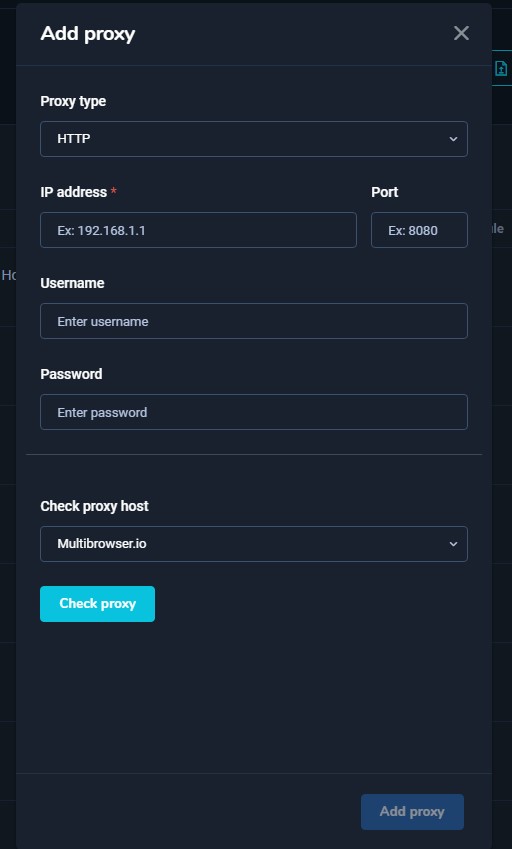
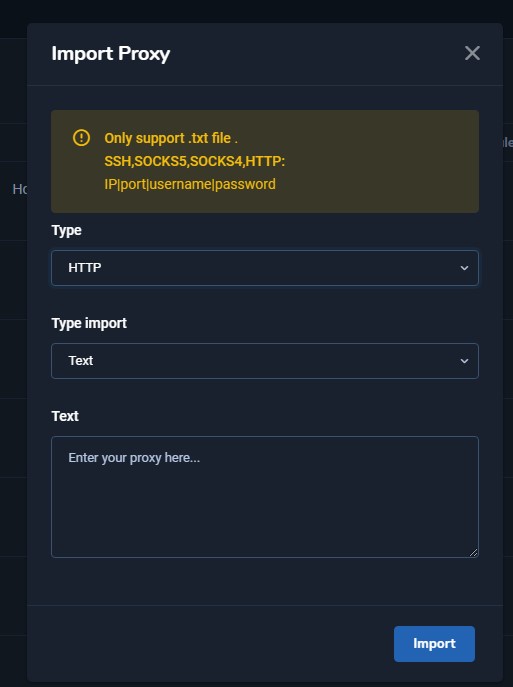
Once you have entered the list of proxies, you can return to the Profiles section to select the Profile you want to add a proxy to (as introduced in the New Profile > Proxy section above).
Besides, Hidemium also supports downloading the proxy list on the software with the Export feature in the Proxies section.
If you need to learn more about the Hidemium user manual, contact the team via:
- Official website: https://hidemium.io/
- Telegram group: https://t.me/hidemium
- Facebook Fanpage: https://www.facebook.com/hidemium.official
- Email: [email protected]
Related Blogs
.png)
In an age where digital privacy is increasingly emphasized, anonymity on the Internet is more than just changing IP address. Websites today can identify users through browser fingerprint – set of unique device parameters. If you are active in the field of making money online and need to create a large number of accounts on the same device, the risk of your account being locked is very high. In[…]

The restricted or locked account is probably a headache for businesses and advertising people. Facebook advertising is the leading trend in promoting online business in the 21st century. Most companies choose to advertise if they want to reach the right potential customers and generate sales quickly. Having an account problem will directly affect revenue. So […]

In today’s multi-platform environment—across Facebook, Google, Amazon, TikTok Ads, and more—managing large numbers of accounts has become increasingly complex. Many individuals and businesses face unstable account performance and frequent suspensions due to overlapping login environments or poorly controlled behavior. As account volume grows, issues such as shared environments, duplicated[…]

In the digital age, most of our devices are constantly connected to networks like Wi-Fi or mobile data. Each connection is identified by a MAC (Media Access Control) address. While you don’t need to change your MAC address often, it can affect your privacy and security online.Thanks to the development of technology, methods of protecting digital identity are also increasingly diverse and[…]

Have you ever wondered why many Amazon sellers are able to generate more revenue? $10,000 per month? In fact, they are not smarter than you, they just know how to Safe business expansion. While most sellers are limited to a single account and struggle to grow, successful ones leverage Multiple Amazon Accounts to capture niche markets and maximize profits.The problem is, Amazon AI system are[…]

Do you think you're truly safe when using the Internet? This might not be as true as you believe. Websites often track your activities using various methods. Among these, browser fingerprinting is considered the most precise and effective tracking technology. This technique creates a unique device fingerprint based on your browser attributes and other identifiable information, posing significant[…]
