
Managing multiple accounts on Instagram is not a simple thing. Photos and videos aren’t synced to one account, confusing you with posting from one account to another. Using multiple accounts also makes it easy for you to be flagged as suspicious by the platform. So what is the optimal way to manage multiple accounts on Instagram? Stay tuned to the article for more details!
What is the use of creating multiple Instagram accounts?

Managing multiple Instagram accounts effectively will bring a lot of benefits to your business:
- According to Instagram’s user behavior survey, most of them like and care about a niche topic or product. So instead of posting all of your content in a single account, you should create multiple Instagram accounts to attract more attention and higher levels of interest and engagement.
- The main reason people create multiple Instagram accounts is also that switching accounts are accessible. For example, You have a personal account and want to switch to a business or brand account without having to log out of this account and log in to another account.
- You get more specific analytics data when you have multiple Instagram accounts, personal and business. It helps you evaluate user behavior and develop an appropriate business plan.
- Favorable for those who do marketing, advertising, pr. For example, TunPham (a famous hot Tiktoker) has an account that creates food content and another account to sell junk food. It will make it easier for your followers to find products they’re interested in.
How many Instagram accounts can I create?
You may not know that “Instagram once encouraged users to register for multiple accounts in a time allowed.” That is also why Instagram still allows creating up to 5 Instagram accounts in the same email address.
However, with the Instagram application that manages multiple accounts on the same email, you need to pay attention to security. Therefore, the email you intend to register needs high security to limit the loss of access to your email account.
How to manage multiple Instagram accounts?
If you are a social media person or business on the Instagram platform, you have probably wondered, “Is there a way to manage multiple Instagram accounts?”. Here are the detailed instructions to do this at the same time, in the same place, without causing confusion or confusion.
Switch multiple Instagram accounts
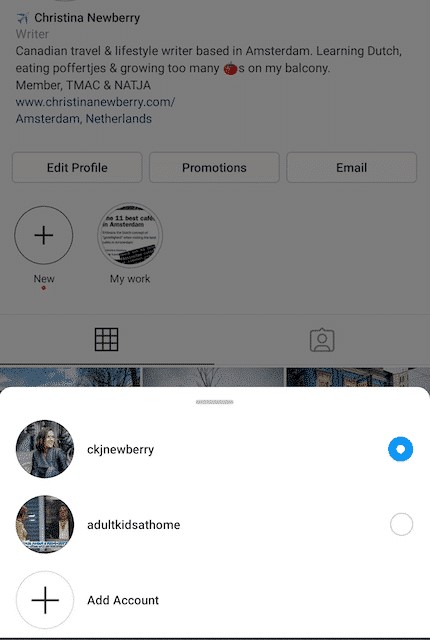
Before you want to switch between accounts, it is required that you have added at least 2 accounts:
1. Tap your Profile page at the top left of the screen.
2. Continue to tap on the three dots that appear on the screen next to the account you selected.
3. When you’re ready to switch to another account, tap the name of the account you want to change.
Post content to multiple Instagram accounts at once
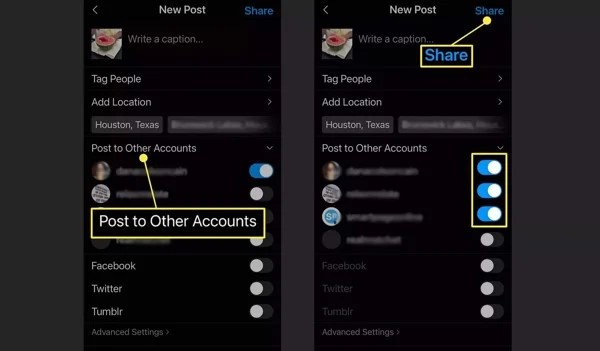
Once you’ve added the accounts to the Instagram app, you can post posts all at once. Turn on posting to another account besides the one you want to post to and continue as usual.
Press the Post button in the top right corner to post. One caveat when posting to multiple Instagram accounts at once is that you must be mindful of photos and constantly post pictures or videos to the correct account.
Enable notifications for multiple Instagram accounts
By adding a few Instagram accounts, you can receive activities and notifications from any or all accounts on your device. In particular, each notice will indicate the relevant account name in parentheses before the content of the message.
To enable this feature, you need to perform the following specific steps:
- Click on the icon with the Profile picture
- Select the three dashes (Menu)
- Click Settings
- Select Notifications
Here you have several options to enable notifications for the activities for which you want to receive notices:
- Turn on post notifications (comments, likes, etc.)
- Turn on message notifications
- Turn on notifications for new followers
- Follow the same steps as above for other accounts.
Manage multiple Instagram accounts with Hidemium( multibrowser)

Another way to manage multiple accounts on Instagram is to use a third-party app. That is Hidemium software; this application will help you manage social network accounts easily. With Hidemium, you can:
- Open different browsers at the same time on one device
- Can use an account without changing IP
- Cookie data sets and browser history are stored in the cloud
- Use a virtual browser to stay anonymous
- Manage countless accounts on social networks such as Facebook and Instagram, etc.
So it can be seen that managing multiple accounts on Instagram is not difficult. Hopefully, the detailed information on how to manage multiple accounts on Instagram will help you get the most out of the platform. From there, it allows you to save time, measure performance, and have a business development plan easier!
Related Blogs

IPv6 (Internet Protocol version 6) is the latest version of the Internet protocol, developed to replace IPv4 which is gradually being exhausted. In this article, Antidetect Browser Hidemium will help you learn what IPv6 is, clarify the difference between IPv6 and IPv4, and explore the outstanding benefits of IPv6 in the context of digital transformation and Internet of Things (IoT) development.1.[…]

Imagine you are relaxing after a day of work by playing a game on your browser, when suddenly a message appears: “Your browser does not support WebGL.” This will definitely make you upset as you cannot continue your experience.At that point, you might be wondering: “Is there anything wrong with my device?” Don't worry! The problem is not with your device, but usually WebGL is not enabled in the[…]

Are you suddenly unable to withdraw, deposit, or access your cryptocurrency wallet on Coinbase? There’s a good chance your account has been restricted. This is not uncommon: some users are flagged after small transactions, while others can have their accounts locked for weeks – even after completing identity verification and contacting support. What’s most frustrating is that you’ll often only[…]

Pixel Tracking is an effective data tracking solution that helps businesses understand user behavior and adjust their marketing strategies accordingly. By recording each action such as clicking, scrolling, or purchasing,Tracking Pixel Provides a comprehensive view of the customer journey. Let's Hidemium Explore in detail how this technology works and the benefits it brings.1. What is Tracking[…]

TikTok is increasingly asserting its position as a potential sales platform in the field of e-commerce. However, many content creators and sellers still face a difficult problem: Cannot attach product links directly on TikTok. This has a significant impact on marketing performance and order conversion. So what is the cause and what is the solution? Together Antidetect Browser Hidemium Find out[…]