
Managing multiple accounts on Instagram is not a simple thing. Photos and videos aren’t synced to one account, confusing you with posting from one account to another. Using multiple accounts also makes it easy for you to be flagged as suspicious by the platform. So what is the optimal way to manage multiple accounts on Instagram? Stay tuned to the article for more details!
What is the use of creating multiple Instagram accounts?

Managing multiple Instagram accounts effectively will bring a lot of benefits to your business:
- According to Instagram’s user behavior survey, most of them like and care about a niche topic or product. So instead of posting all of your content in a single account, you should create multiple Instagram accounts to attract more attention and higher levels of interest and engagement.
- The main reason people create multiple Instagram accounts is also that switching accounts are accessible. For example, You have a personal account and want to switch to a business or brand account without having to log out of this account and log in to another account.
- You get more specific analytics data when you have multiple Instagram accounts, personal and business. It helps you evaluate user behavior and develop an appropriate business plan.
- Favorable for those who do marketing, advertising, pr. For example, TunPham (a famous hot Tiktoker) has an account that creates food content and another account to sell junk food. It will make it easier for your followers to find products they’re interested in.
How many Instagram accounts can I create?
You may not know that “Instagram once encouraged users to register for multiple accounts in a time allowed.” That is also why Instagram still allows creating up to 5 Instagram accounts in the same email address.
However, with the Instagram application that manages multiple accounts on the same email, you need to pay attention to security. Therefore, the email you intend to register needs high security to limit the loss of access to your email account.
How to manage multiple Instagram accounts?
If you are a social media person or business on the Instagram platform, you have probably wondered, “Is there a way to manage multiple Instagram accounts?”. Here are the detailed instructions to do this at the same time, in the same place, without causing confusion or confusion.
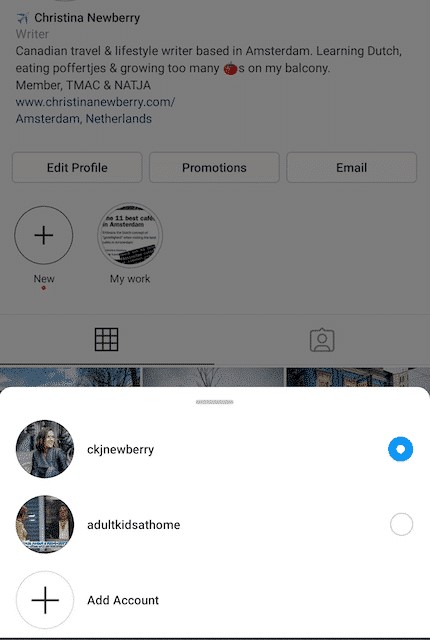
Switch multiple Instagram accounts
Before you want to switch between accounts, it is required that you have added at least 2 accounts:
1. Tap your Profile page at the top left of the screen.
2. Continue to tap on the three dots that appear on the screen next to the account you selected.
3. When you’re ready to switch to another account, tap the name of the account you want to change.
Post content to multiple Instagram accounts at once
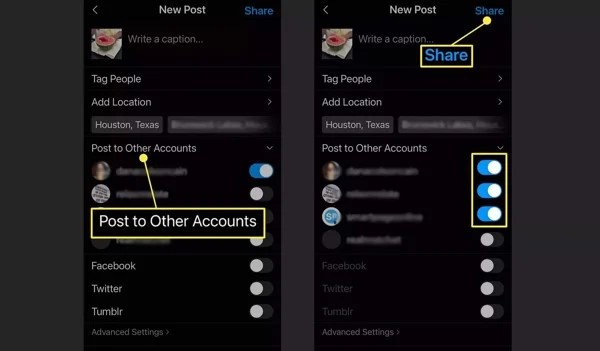
Once you’ve added the accounts to the Instagram app, you can post posts all at once. Turn on posting to another account besides the one you want to post to and continue as usual.
Press the Post button in the top right corner to post. One caveat when posting to multiple Instagram accounts at once is that you must be mindful of photos and constantly post pictures or videos to the correct account.
Enable notifications for multiple Instagram accounts
By adding a few Instagram accounts, you can receive activities and notifications from any or all accounts on your device. In particular, each notice will indicate the relevant account name in parentheses before the content of the message.
To enable this feature, you need to perform the following specific steps:
- Click on the icon with the Profile picture
- Select the three dashes (Menu)
- Click Settings
- Select Notifications
Here you have several options to enable notifications for the activities for which you want to receive notices:
- Turn on post notifications (comments, likes, etc.)
- Turn on message notifications
- Turn on notifications for new followers
- Follow the same steps as above for other accounts.
Manage multiple Instagram accounts with Hidemium( multibrowser)

Another way to manage multiple accounts on Instagram is to use a third-party app. That is Hidemium software; this application will help you manage social network accounts easily. With Hidemium, you can:
- Open different browsers at the same time on one device
- Can use an account without changing IP
- Cookie data sets and browser history are stored in the cloud
- Use a virtual browser to stay anonymous
- Manage countless accounts on social networks such as Facebook and Instagram, etc.
So it can be seen that managing multiple accounts on Instagram is not difficult. Hopefully, the detailed information on how to manage multiple accounts on Instagram will help you get the most out of the platform. From there, it allows you to save time, measure performance, and have a business development plan easier!
Related Blogs

Telegram bị chặn bởi nhà mạng tại Việt Nam đang là chủ đề nhận được sự quan tâm lớn từ cộng đồng người dùng. Sáng ngày 26/5/2025, nhiều người tại Việt Nam bất ngờ không thể truy cập và sử dụng ứng dụng Telegram như bình thường. Điều này gây gián đoạn trong quá trình liên lạc cá nhân, trao đổi công việc cũng như sao lưu tài liệu quan trọng.Nhằm giúp người dùng khắc phục tình trạng này, bài viết[…]
.png)
In the digital age, protecting privacy and accessing geo-restricted content on Android has become essential. Using a free VPN is an effective solution to browse securely, bypass access restrictions, and protect personal data. Here’s the list of the top 10 free VPN apps for Android in 2025, rated based on speed, security, and user experience.1. What is a VPN and why do you need it on Android?A VPN[…]

When accessing the website, the browser reports an error “DNS server not responding”, which means your computer cannot connect to the DNS server to convert the domain name into an IP address. This is one of the common network errors that disrupts web surfing and affects user experience. In this article, Antidetect Browser Hidemium will help you understand What is DNS server not responding?, the[…]

VPN Site-to-Site and VPN Client-to-Site are two widely used virtual private network connection models, especially in businesses that need to ensure data security and remote access. If Client-to-Site VPN is suitable for individuals who need to access internal systems remotely, Site-to-Site VPN plays the role of connecting branches together through an encrypted connection, operating as a unified[…]

User Agent (UA) is an important component that helps browsers recognize and interact with websites effectively. Understanding what User Agent is and how to change it can not only protect your privacy but also optimize your browsing experience according to your personal needs. In this article,Antidetect Browser Hidemium will explain in detail about User Agent, its role and guide you how to change[…]

In the modern internet environment, security is always a top concern. One of the factors that plays an important role in protecting online data is Port 443 - the standard connection port of the HTTPS protocol. So specifically Port What is 443? and why is it so important? Let's go together Antidetect Browser Hidemium Learn how Port 443 works, functions and instructions for using Port 443[…]
