
Gmail is a free email client provided by Google. On average, each person will have at least 1 Gmail account to serve work or log in to necessary social networking platforms such as Facebook, TikTok, Instagram, etc. However, Gmail accounts are easy to manage if you only use one account. But what if you own multiple Gmail accounts at the same time? If you still don’t know how to handle this ironic situation, follow the article to learn how to manage multiple Gmail accounts simultaneously!

Open Gmail with different browsers
It is probably the most common way to manage multiple email accounts that most people know. You can open multiple browsers simultaneously, such as Chrome, Coc Coc, Microsoft Edge, etc., so you can log in to many different accounts simultaneously.
Another small tip is to use the incognito tab to log in. It would help if you pressed Shift+Ctrl+N to open an anonymous account. However, when using the incognito tab, your password will not be saved, and each time you will have to log in from the beginning.
Use the Google Multiple Sign-In feature
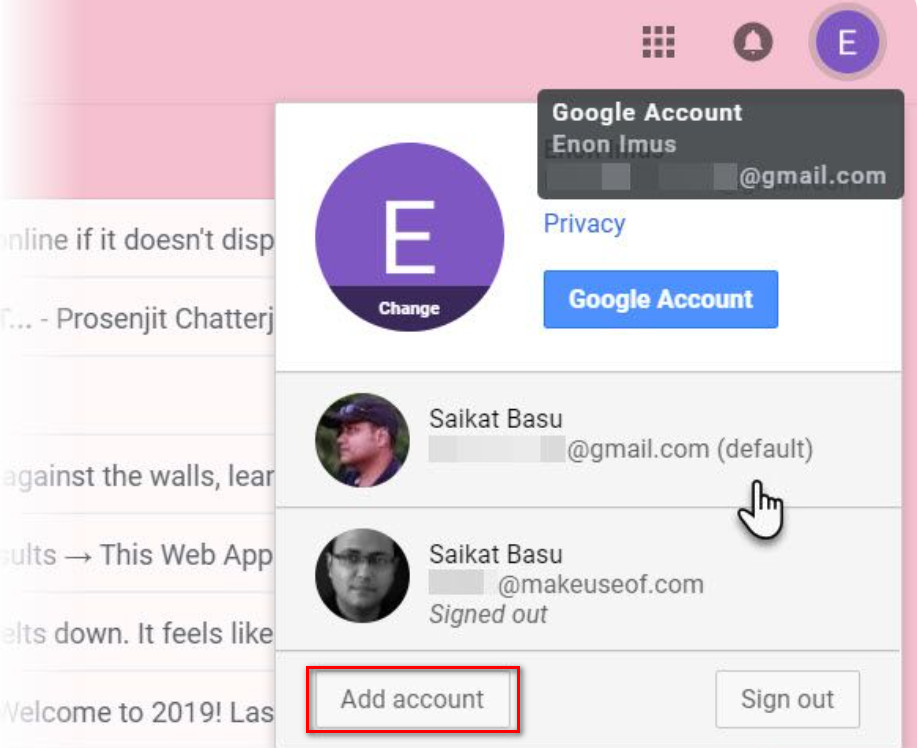
Google’s Google Multiple Sign-In feature allows you to sign in to multiple accounts on the same browser. You can log in to your primary Gmail account. Then, click on the icon in the right corner of the screen to choose another account. Finally, you need to open a new tab and log in to your different accounts one by one. It can be said that using the Google Multiple Sign-In feature is one of the best ways to manage multiple email accounts at the same time.
This feature has been around for quite some time. However, it is one of the most convenient and easy methods to implement because it does not take too much of your time. You should consider this feature if you simply manage a handful of Gmail for studying and working.
Manage Gmail with Google Chrome’s Account Switcher
This method is also relatively effective if you want to manage multiple Gmail accounts simultaneously. Follow these steps to start managing your accounts:
- Open google chrome
- Then click on the icon in the right corner of the screen
- Next, click add
- Select sign in
- Next, sign in to your Google account
After successful login, chrome will open a new window and separate browser session. Remember to select sync mode for your google account so you can back up and access new tags, so bookmark other pages on your other accounts.
Add an Email account and forward it to the main Gmail account
Besides the ways mentioned above, there is another way for you to manage multiple Gmail accounts simultaneously. With the operation of adding an Email account and forwarding it to the main Gmail account, you can manage multiple email accounts on one original Gmail account simultaneously. Specifically, the steps will be performed in the following order:
- Access to secondary Gmail accounts that you need to use.
- Next, choose the settings.
- Choose to see all settings.
- Click the Forwarding POP/IMAP tab.
- Add a forwarding address and enter the destination email.
- Then select Next and confirm that the verification code has been sent to the destination email address.
- Proceed to enter the verification code
- Select verify to verify the forwarding address
- Click Forward a copy of incoming mail to your target account (also, you can choose what happens to the composition of the email in the source account).
Hidemium software

You can understand Hidemium, an account-raising software. With this application, you can feed batch profiles of Gmail and other accounts such as Facebook, Twitter, Blogger, etc. This is a great support tool if you are looking for a way to manage multiple email accounts from one place.
Hidemium has many outstanding features, such as:
- Log in to multiple accounts at the same time.
- At the same time, you can use multiple profiles on your computer without fear of having the same IP.
- You can save a cookie profile and easily log in the next time you work with a previously stored profile.
- Hidemium does not limit the number of runs and is very easy to manage and use.
Hidemium is at the top of the best applications for managing multiple email accounts simultaneously. If you are having trouble with this, don’t hesitate to try the free 7-day Hidemium plan now!
Through the above information, do you know how to manage multiple Gmail accounts simultaneously? We have listed many different methods, and you are free to choose the one that works for you. If you have questions, you can immediately pick up the phone and call our hotline for assistance.
Related Blogs
.png)
Dolphin Anty is an outstanding Antidetect Browser, developed in Russia with the goal of serving users who need to manage multiple online accounts securely. However, in 2025, will this still be the optimal choice for MMO and digital marketing activities? Be tickledof Hidemium DOverview of pros and cons of Dolphin Anty browser to make the most accurate decision.1. What is Dolphin Anty?Dolphin Anty[…]

Looking for a free, easy-to-use, and reliable VPN solution? Radmin VPN is the right choice. Together Antidetect Browser Hidemium. Discover in detail what Radmin VPN is, what it does, and how to download this software for free to your computer below.1. What is Radmin VPN?Radmin VPN is a completely free virtual private network (VPN) software that allows users to set up and manage virtual LANs[…]

Swiftproxy 2025: Residential Proxy Service Review In 2025, Swiftproxy continues to stand out in the competitive proxy market. Whether you're an individual prioritizing privacy and anonymity or a business requiring large-scale IP resources, Swiftproxy delivers convenience, reliability, and robust performance.With high-quality IP pools, global reach, and a 99.89% connection success rate, Swiftproxy[…]

In a network system, MAC address and IP address Both serve to identify devices, but they perform completely different functions. Understanding the difference between these two types of addresses not only helps you manage your network better, but is also key to ensuringinformation security – especially for those working in the field Cyber Security or digital marketing.Let's go together Hidemium[…]

Viettel DNS is a simple yet effective solution to bypass network restrictions like Facebook blocking, slow YouTube loading, or unstable internet connections. So what DNS addresses does Viettel currently offer? How can you change DNS settings to improve internet speed? Let’s dive into the details with Hidemium.1. List of Popular Viettel DNS AddressesViettel DNS is a Domain Name System service[…]

