

Want to keep your business and personal life separate on Twitter? Don’t mix business with pleasure. Just create a second (or third) Twitter account and switch quickly. So how to manage accounts on this platform at the same time easily? Continue reading the following article to learn how simple Twitter manages multiple accounts!
How to create a new Twitter account on the web?

You are free to create as many Twitter accounts as you want. Each account must be created with a different username, but they can all be linked to the same email address if you set up with Gmail. Add a dot anywhere in the username, and you’ve immediately created a new account. Twitter will read these addresses as different users.
You can create an account on Twitter.com or the iOS or Android mobile app. Let’s start developing the website first.
- Step 1: Go to www.twitter.com link on any browser you want and log in to your existing account.
- Step 2: Click your Twitter profile picture icon on the left navigation lane below the New Tweet button.
- Step 3: You will get the option “Add an existing account.” If your second account has not been created, then create one, and next, add the existing first account to the second account or vice versa.
How to switch between multiple Twitter accounts on the mobile app
Once you have finished combining your accounts, combining them for concurrent management is necessary. The process to switch between other accounts on the Twitter web and the Twitter mobile app is as follows:
ON TWITTER WEB:
- Step 1: Go to the Profile Photo icon under the New Tweet button on the left navigation lane.
- Step 2: The menu will show all the accounts that are being merged with that account. Click on the account you want to convert, and you can go to another account.
ON THE TWITTER APP:
- Step 1: If you are using an iPhone, tap the profile avatar in the upper left corner, then go to the three-dot Profile icon. On iPad, tap More and go to your Profile icon.
- Step 2: A list will appear with all the joint accounts from which you can select the account you want to switch.
Some frequently asked questions when setting up a twitter account
- Can I create multiple Twitter accounts?
Yes, you can have multiple accounts on Twitter using the same email. Just a little change (for Gmail users), different emails, or different phone numbers. You can even connect up to 5 of them to switch between accounts more conveniently.
- Is it possible to create multiple Twitter accounts with the same email?
Using Gmail, you can optionally create multiple Twitter accounts with the same email address. All it takes is a little tweaking with a dot or something in the middle of the email. These edited email ids will be read differently by Twitter, even though they all refer to the same id.
However, if you are using email from Yahoo, Outlook, or any other email service, you will not be able to create a new Twitter account using the same email id as with Gmail above.
- Does own multiple accounts violate Twitter’s rules?
No, creating multiple accounts on Twitter does not violate Twitter’s rules, as the platform allows you to connect your multiple accounts for ease of use. However, Twitter does not allow users to create multiple accounts with the same email id or phone number to minimize the number of Spam or Pretend accounts on this popular social media platform.
Manage multiple Twitter accounts easily with Hidemium
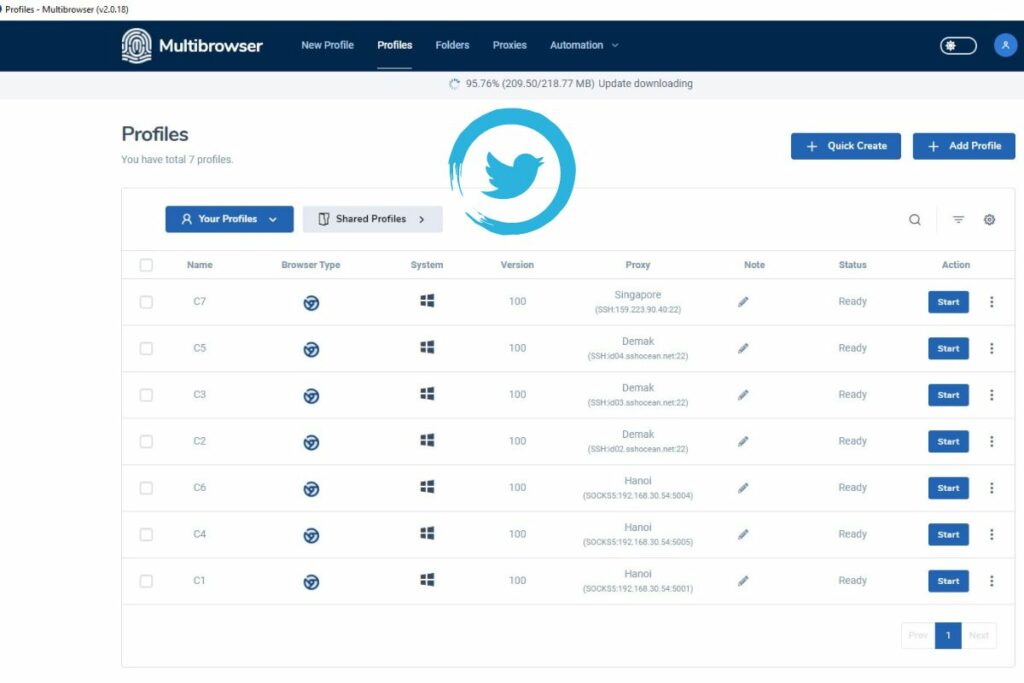
Having to deal with different browsers when managing multiple social media accounts, such as Twitter, can be frustrating and reduce your work efficiency. However, with support from Mutibrowser software, you can manage multiple accounts quickly and easily.
Compared to browser plugins, Hidemium is more convenient when allowing users to switch between accounts and browser profiles on just one machine with outstanding advantages such as:
- Create multiple browsers with different operating systems, and emulate IP,…
- Use a separate proxy for each of your accounts.
- Share access to the account without providing a password.
- Automatically log in and reopen tabs in the previous session.
- Prevent unauthorized access to accounts.
Hidemium makes it easy to switch between multiple accounts with just one light click. You can install the software to serve the needs of operating on Twitter to manage multiple accounts more conveniently.
Related Blogs

Trong thời đại CNTT hiện nay, việc duyệt web an toàn đang trở thành mối quan tâm hàng đầu của nhiều người. Nếu không cẩn thận bạn sẽ rất dễ bị theo dõi và thu thập thông tin cá nhân. Để giải quyết vấn đề này, Antidetect Browser đã nổi lên như một giải pháp […]

Torrenting is a peer-to-peer method for distributing large files, where many participants exchange small pieces concurrently so downloads and uploads proceed efficiently without relying on a single central server.Clear rules, reputable sources, and routine checksums make torrenting predictable for legitimate content such as open-source software, public datasets, and authorized media that rights[…]

In the following analysis, Hidemium will review anti-detection browsers in detail, focusing on three tools from China: YunLark, Maskfog, and VMMask. These browsers are designed to suit the Chinese Internet environment, comply with the “great firewall” and support VPN connections.However, to deploy advertising on international platforms, users often need more advanced tools. This is also the[…]

1. What is DNS Encryption?DNS encryption is a security technology that protects domain name queries when you visit websites. Instead of sending plain-text requests, your DNS queries are encrypted to prevent third-party tracking or interference. This is a key method to enhance online privacy and security.>>> Learn more: Latest Viettel DNS & How to change DNS to improve Internet speed2. Why Does[…]
.png)
Using multiple Gmail accounts can help you separate personal and work emails, but it can also become challenging when you constantly switch between accounts or need to keep track of important emails. You may encounter issues like sending emails from the wrong account or managing a cluttered inbox. Here are effective methods and tools to help you efficiently manage multiple Gmail accounts.1.[…]

Scaling your business on TikTok is the goal of many sellers. However, the biggest obstacle when operating multiple shops is the platform’s strict moderation policies. If you’re not careful, even a small mistake related to IP addresses or devices can result in mass shop suspensions, causing serious losses in revenue and operational time.So how can you manage multiple TikTok Shop stores without[…]
